MultiBit Classic: How It Worked & How to Recover
MultiBit Classic reference: how the wallet stores keys, what files matter, and how to recover Bitcoin from legacy backups.
What is MultiBit Classic?
MultiBit Classic was a lightweight Bitcoin wallet created in 2011 by developer Jim Burton. It was one of the first SPV (Simplified Payment Verification) wallets, which meant users could manage their Bitcoin without downloading the entire blockchain — a significant practical advantage at the time.
Released
2011
Final Version
v0.5.18
Discontinued
2017
Is MultiBit Classic Still Working?
No, MultiBit Classic is no longer functional. After KeepKey acquired MultiBit in 2016, development ceased, and the wallet was officially discontinued in July 2017.
- ✗Cannot sync with the Bitcoin network
- ✗Cannot send or receive transactions
- ✗No longer receives security updates
- ✓Your Bitcoin is still on the blockchain and recoverable
How to Recover Your Bitcoin
Even though MultiBit Classic no longer works, your Bitcoin is safe on the blockchain. You just need to extract your private keys and import them into a modern wallet.
Recover from Wallet File
Extract private keys from your .wallet or .key files and import them into Electrum.
View guideImport Private Keys
Already have your private keys exported? Learn how to import them into Electrum.
View guideExport Private Keys
Step-by-step guide to export private keys from MultiBit Classic wallet files.
View guideForgot Password?
Options for recovering encrypted wallets when you've forgotten the password.
View optionsDownload MultiBit Classic
Need to access the MultiBit Classic software to recover your wallet? Download the final version (v0.5.18) for your operating system. Only use this for recovery purposes.
Download MultiBit Classic v0.5.18Where Are My MultiBit Classic Wallet Files?
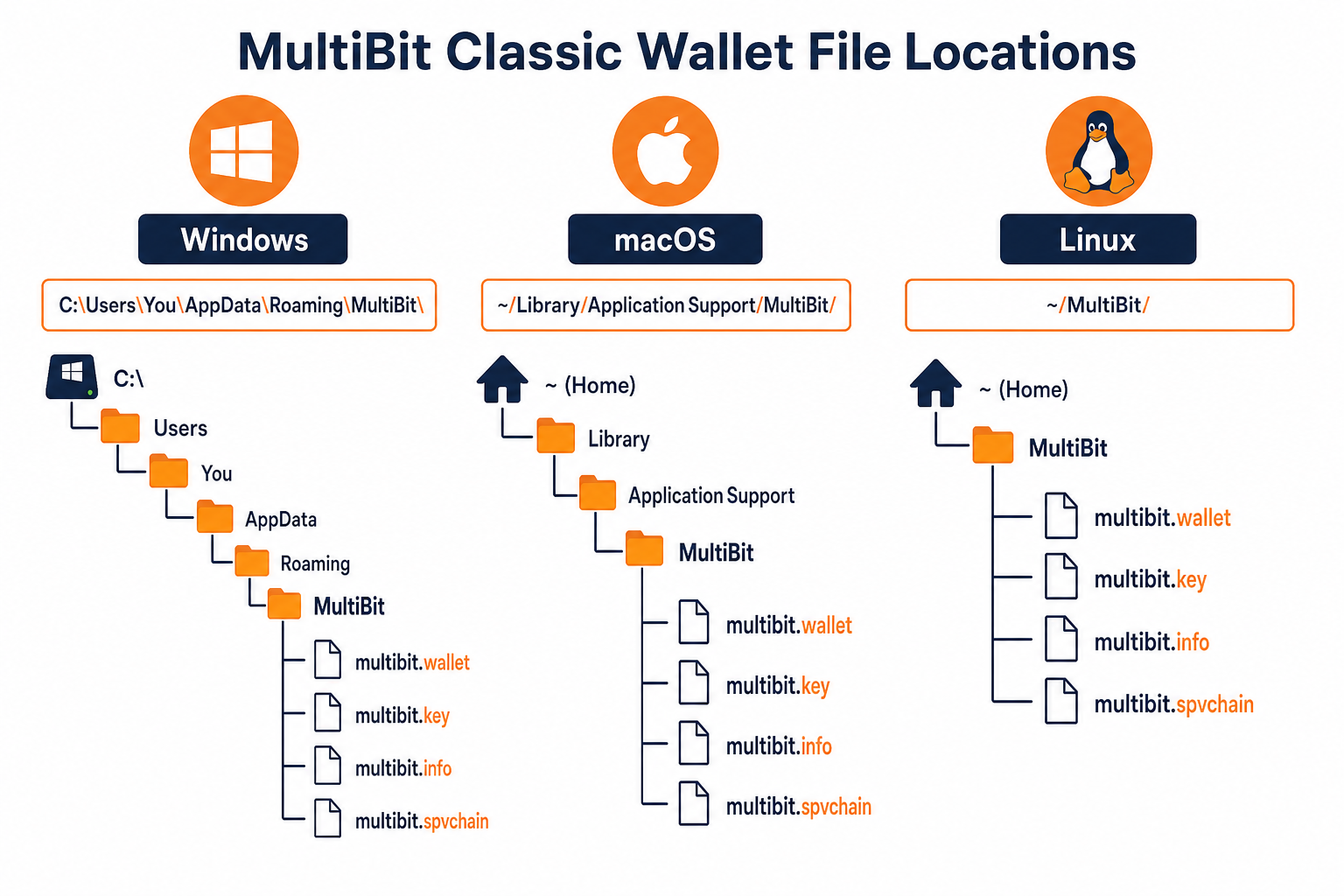
| Operating System | Default Location |
|---|---|
| Windows | C:\Users\[Username]\AppData\Roaming\MultiBit |
| macOS | ~/Library/Application Support/MultiBit |
| Linux | ~/.multibit |
Look for files ending in .wallet or .key. These contain your private keys.
Related Resources
Frequently Asked Questions
What is MultiBit Classic?
MultiBit Classic was a lightweight Bitcoin wallet released in 2011. It was one of the first SPV (Simplified Payment Verification) wallets, allowing users to store Bitcoin without downloading the full blockchain.
Is MultiBit Classic still working?
No, MultiBit Classic was officially discontinued in 2017. It no longer syncs with the Bitcoin network and should not be used for transactions. However, you can still recover Bitcoin from old wallet files.
How do I recover Bitcoin from MultiBit Classic?
You can recover Bitcoin by exporting your private keys from MultiBit Classic wallet files (.wallet, .key) and importing them into a modern wallet like Electrum. See our recovery guides for step-by-step instructions.
Where are MultiBit Classic wallet files stored?
On Windows: C:\Users\[Username]\AppData\Roaming\MultiBit. On macOS: ~/Library/Application Support/MultiBit. On Linux: ~/.multibit. Look for files ending in .wallet or .key.
What's the difference between MultiBit Classic and HD?
MultiBit Classic uses individual private keys stored in .wallet files, while MultiBit HD uses a 12-word seed phrase for hierarchical deterministic key generation. Classic requires exporting keys; HD can be recovered with just the seed phrase.